Table of Contents
- Introduction
- Method 1: Check Your Phone’s Mobile Network Settings
- Method 2: Check the Phone’s Specifications
- Method 3: Check the Processor/Chipset
- Method 4: Check Supported 5G Bands
- How to Check 5G Support on Samsung Phones
- How to Check 5G Support on Xiaomi/Redmi Phones
- How to Check 5G Support on Infinix and Tecno Phones
- Why 5G May Not Appear Even on a 5G Phone
- Does Your SIM Need 5G Support?
- How to Enable 5G on Android
- Common Misconceptions
- Frequently Asked Questions
- Where to Verify Specs & Info
- Discussion
Introduction
Seeing “5G” on a phone’s box or a 5G icon in the status bar doesn’t automatically mean the phone is ready for every 5G network. Phone brands market “5G support” loosely, and the real answer depends on several layers working together: the chipset inside the phone, the specific 5G bands it supports, the SIM and carrier plan, and whether 5G is even live in your area yet.
We researched official phone specifications, chipset documentation, and Android settings behavior to put together a guide that helps you confirm 5G support properly — not just guess based on marketing.
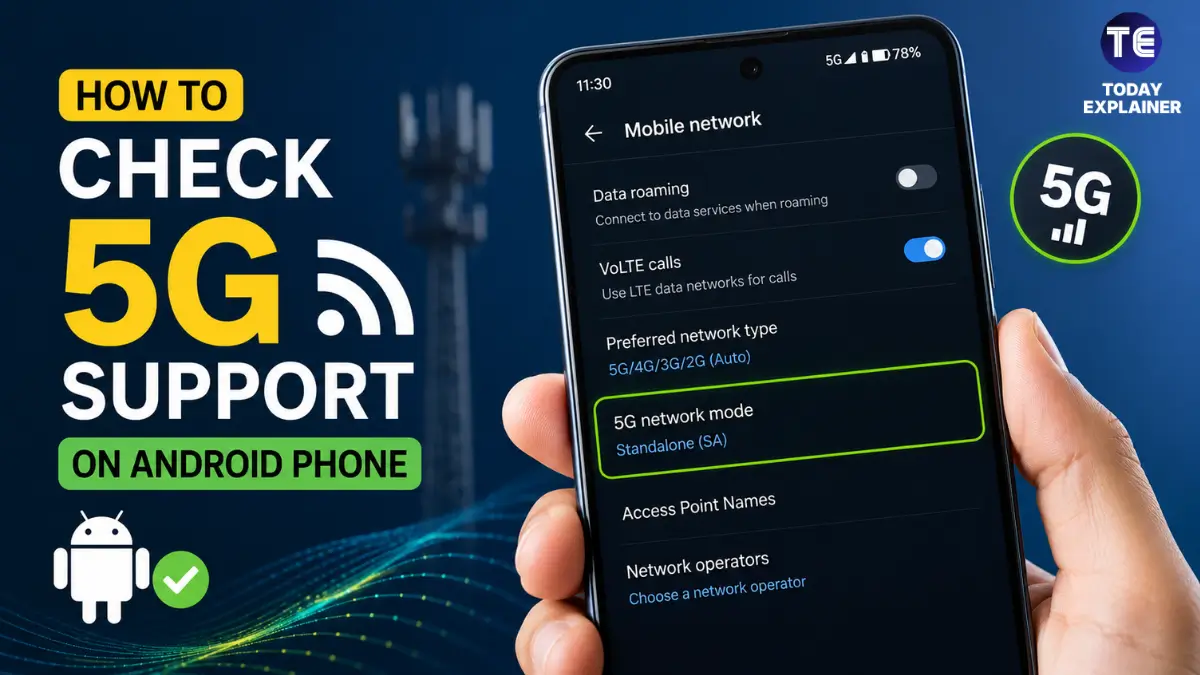
Quick Answer: Go to Settings > Network & Internet > SIM/Mobile Network > Preferred Network Type. If “5G” appears as an option, your phone’s hardware supports it. To be fully sure, also check the phone’s official spec sheet for supported 5G bands, since seeing the option doesn’t guarantee it works with every carrier.
This guide walks through four practical methods to check 5G support, brand-specific steps for Samsung, Xiaomi/Redmi, Infinix, and Tecno phones, and explains why a phone can technically be “5G” but still show no 5G icon in daily use.
Method 1: Check Your Phone’s Mobile Network Settings
This is the quickest way to check, and it works on almost any Android phone running Android 11 or later.
- Open Settings
- Tap Network & Internet (or Connections on some Samsung phones)
- Tap SIM cards or Mobile network
- Tap Preferred network type (sometimes labeled Network mode)
- Look for a 5G option in the list, alongside 4G/LTE, 3G, and 2G
If 5G appears as a selectable option, the phone’s radio hardware supports it. If you only see 4G/LTE and below, the phone does not have 5G hardware, regardless of what a seller may have told you.
Buying Tip: If you’re checking a used or grey-market phone before buying it, do this check in person before paying. A missing 5G option in settings is a hardware limitation — no software update can add it later.
Method 2: Check the Phone’s Specifications
If the settings menu doesn’t show a clear 5G option, or you want to confirm before even seeing the phone, check the official specification sheet.
Search the exact phone model name on GSMArena or the manufacturer’s official website, and look at the Network section of the spec sheet. It will list supported network types (2G/3G/4G/5G) directly. This is the most reliable single source, since it comes straight from verified technical data rather than a settings menu that can behave inconsistently across Android skins.
Method 3: Check the Processor/Chipset
5G support ultimately comes down to the modem built into the phone’s chipset (SoC). If you know the chipset name, you can often tell immediately whether 5G is possible.
| Chipset Family | 5G Support | Common In |
|---|---|---|
| Snapdragon 4 Gen 2, 6 Gen 1, 7 Gen series, 8 Gen series | Yes | Mid-range to flagship Android phones |
| Snapdragon 600/400 series (older, pre-2021) | Usually No | Older budget phones |
| MediaTek Dimensity series | Yes | Budget to mid-range 5G phones |
| MediaTek Helio series | No | Older or ultra-budget phones |
| Exynos 1330, 1380, 1480, 2200+ | Yes | Samsung mid-range and flagship phones |
| Unisoc T606, T612, T7200 (select models) | Mixed — check specific model | Entry-level budget phones |
Chipset name alone isn’t always definitive for every sub-variant, so it’s worth cross-checking with Method 2 if you’re unsure.
Method 4: Check Supported 5G Bands
This is the step most buyers skip, and it’s the one that actually determines whether 5G will work reliably with your carrier. A phone can technically “support 5G” while missing the exact band your local network uses, resulting in no real-world 5G connection.
On the phone’s official spec sheet, look for a section labeled 5G bands or NR bands (NR stands for New Radio, the technical name for 5G). It will list numbers like n1, n3, n28, n40, n41, n78, and so on. Compare these against the bands your carrier has publicly announced for its 5G rollout. If there’s no overlap, the phone won’t get 5G on that network even though the hardware technically supports 5G elsewhere in the world.
How to Check 5G Support on Samsung Phones
- Open Settings
- Tap Connections
- Tap Mobile networks
- Select your SIM (if dual SIM)
- Tap Network mode
- Check whether 5G/4G/3G/2G (Auto Connect) appears in the list
Most Samsung Galaxy A-series phones from the A14 5G and newer, along with all Galaxy S and Z series phones since the S20, include 5G hardware. Older Galaxy A-series phones without “5G” in the model name (e.g., Galaxy A14, not A14 5G) are 4G-only.
How to Check 5G Support on Xiaomi/Redmi Phones
- Open Settings
- Tap SIM cards & mobile networks
- Select your active SIM
- Tap Preferred network type
- Look for 5G in the options list
Xiaomi and Redmi label 5G clearly in the product name for most recent models (e.g., Redmi Note 13 Pro 5G versus the standard Redmi Note 13, which is 4G-only). Always check whether “5G” is explicitly in the model name before assuming.

How to Check 5G Support on Infinix and Tecno Phones
- Open Settings
- Tap Mobile Network (sometimes under Connection & Sharing)
- Tap your SIM
- Tap Preferred Network Type
- Check for a 5G entry
Infinix Zero and Note series 5G variants, along with several Tecno Camon and Spark 5G models, include 5G chipsets, but both brands also sell visually similar 4G-only variants under nearly identical names. The safest check for these brands specifically is comparing the exact model number against the official spec sheet, since retail naming in Pakistan can be inconsistent between 4G and 5G variants of the same series.
Why 5G May Not Appear Even on a 5G Phone
If your phone supports 5G in settings but you never actually see a 5G icon, a few things could be happening:
- No 5G coverage in your area yet — 5G rollout in Pakistan has been limited and city-specific as of 2026, so even a fully capable phone will simply fall back to 4G where there’s no 5G signal.
- Your SIM or plan doesn’t support 5G — see the next section.
- Band mismatch — the phone’s supported 5G bands don’t overlap with the carrier’s deployed bands in your area.
- Network mode set to 4G-only — some users unknowingly disable 5G in the preferred network type setting to save battery.
Does Your SIM Need 5G Support?
Yes. Having 5G hardware in your phone is only half the requirement. Your SIM card also needs to be a 5G-compatible SIM (most SIMs issued in the last few years are, but very old SIM cards may not be), and your mobile plan or package needs to include 5G access where the carrier offers it. Contact your carrier or check their official app/website to confirm your SIM and current package support 5G.
How to Enable 5G on Android
- Go to Settings > Network & Internet > SIM/Mobile Network
- Tap Preferred network type
- Select 5G/4G/3G/2G (Auto Connect) or simply 5G
- Restart the phone if the icon doesn’t update immediately
- Confirm the SIM is inserted correctly and has an active data package
If 5G doesn’t appear as an option at all after following these steps, the phone’s hardware does not support it, and no settings change will add it.
Common Misconceptions
Myth: If the phone box says “5G Ready,” the phone definitely gets 5G everywhere. Reality: “5G Ready” only confirms the hardware supports some 5G bands somewhere — not necessarily the bands your local carrier uses.
Myth: A higher price always means better 5G performance. Reality: Two phones at very different price points can support the same core 5G bands; price differences often come from camera, display, and build quality rather than network capability.
Myth: If you see “5G” in the status bar once, the phone always gets 5G. Reality: The icon can switch between 5G and 4G/LTE depending on signal strength and coverage in your exact location.
Myth: Dual-SIM phones get 5G on both SIM slots simultaneously. Reality: Most dual-SIM Android phones only support 5G on one SIM slot at a time (often called DSDS limitations); the second SIM typically falls back to 4G.
Myth: Rooting or installing a custom ROM can add 5G to a 4G-only phone. Reality: 5G support is a hardware/modem limitation. No software, root access, or ROM can add a radio component that isn’t physically present.
Myth: All phones sold in Pakistan officially support the exact 5G bands Pakistani carriers will eventually use. Reality: Many phones sold here are global variants; it’s worth checking specific band numbers rather than assuming full compatibility.
Frequently Asked Questions
Q: How do I know for sure if my phone has 5G without going through settings? A: Check the exact model name and number on GSMArena or the brand’s official website and look at the Network section of the spec sheet — it will state 5G support directly.
Q: Is there an app that can check 5G support instantly? A: Yes, apps like “Network Cell Info Lite” or “Signal Checker” can display current network type and supported bands, though the phone’s built-in settings menu is usually enough.
Q: Why does my phone show 5G but internet speed feels the same as 4G? A: This usually means you’re connected to a lower-tier 5G band (sometimes called non-standalone 5G), which behaves closer to advanced 4G speeds until fuller 5G infrastructure is deployed in your area.
Q: Do I need a new SIM card to use 5G? A: Not always. Most SIM cards issued in recent years already support 5G, but it’s worth confirming with your carrier if your SIM is more than a few years old.
Q: Does every flagship phone support 5G? A: Nearly all flagship phones released since 2021 support 5G, but it’s still worth confirming the specific bands rather than assuming automatically.
Q: Can a 4G-only phone receive a software update to add 5G? A: No. 5G requires a physical modem/chipset component. Software updates cannot add hardware capability.
Q: Is 5G available across Pakistan yet? A: As of 2026, 5G rollout in Pakistan has been limited to select trials and city-specific deployments rather than nationwide coverage; availability depends heavily on your carrier and location.
Q: What’s the difference between “5G” and “5G Ready” in phone marketing? A: They generally mean the same thing — the phone has 5G-capable hardware — but the exact bands supported can still vary, so checking the spec sheet remains important.
Q: Do budget phones under PKR 30,000 ever support 5G? A: Yes, some budget phones using MediaTek Dimensity or newer Snapdragon 4-series chipsets now include 5G, though it’s less common than in mid-range and flagship models.
Q: Why does my phone’s 5G option disappear sometimes? A: This can happen if the phone automatically falls back to 4G due to weak 5G signal, or if the SIM slot with 5G is in the second/inactive slot on a dual-SIM device.
Q: Is PTA approval related to 5G support? A: They’re separate. PTA approval concerns whether a phone’s IMEI is registered to work legally on Pakistani networks at all; 5G support concerns whether the phone’s hardware includes a 5G modem and matching bands.
Q: Can I check 5G band support without technical knowledge? A: Yes — the spec sheet lists them as simple numbers (like n1, n3, n78). You don’t need to understand the technical details; you just need to compare them against your carrier’s published 5G bands.
Q: Does turning on 5G drain the battery faster? A: Yes, generally. 5G radios consume more power than 4G, especially when signal is weak, so some users intentionally keep the network mode on 4G to save battery until 5G coverage improves.
Q: Will my current phone become useless once 5G fully rolls out? A: No. Carriers maintain 4G networks alongside 5G for years during rollout, so a 4G-only phone will continue to work normally.
Where to Verify Specs & Info
- GSMArena — full technical specification sheets, including network bands, for almost every phone model
- Official brand websites (Samsung, Xiaomi, Infinix, Tecno) — manufacturer-confirmed specs for current lineups
- PTA (Pakistan Telecommunication Authority) — official information on device registration and network policy in Pakistan
- Your mobile carrier’s official app or website — for confirming 5G availability, SIM compatibility, and package details in your specific area
Discussion
Have you checked your own phone using the settings method above — did 5G show up as expected? Are you noticing 5G coverage in your city yet, or is it still mostly 4G/LTE in daily use? Share your experience and your phone model in the comments below — it helps other readers get a real sense of where 5G actually works in Pakistan right now.